
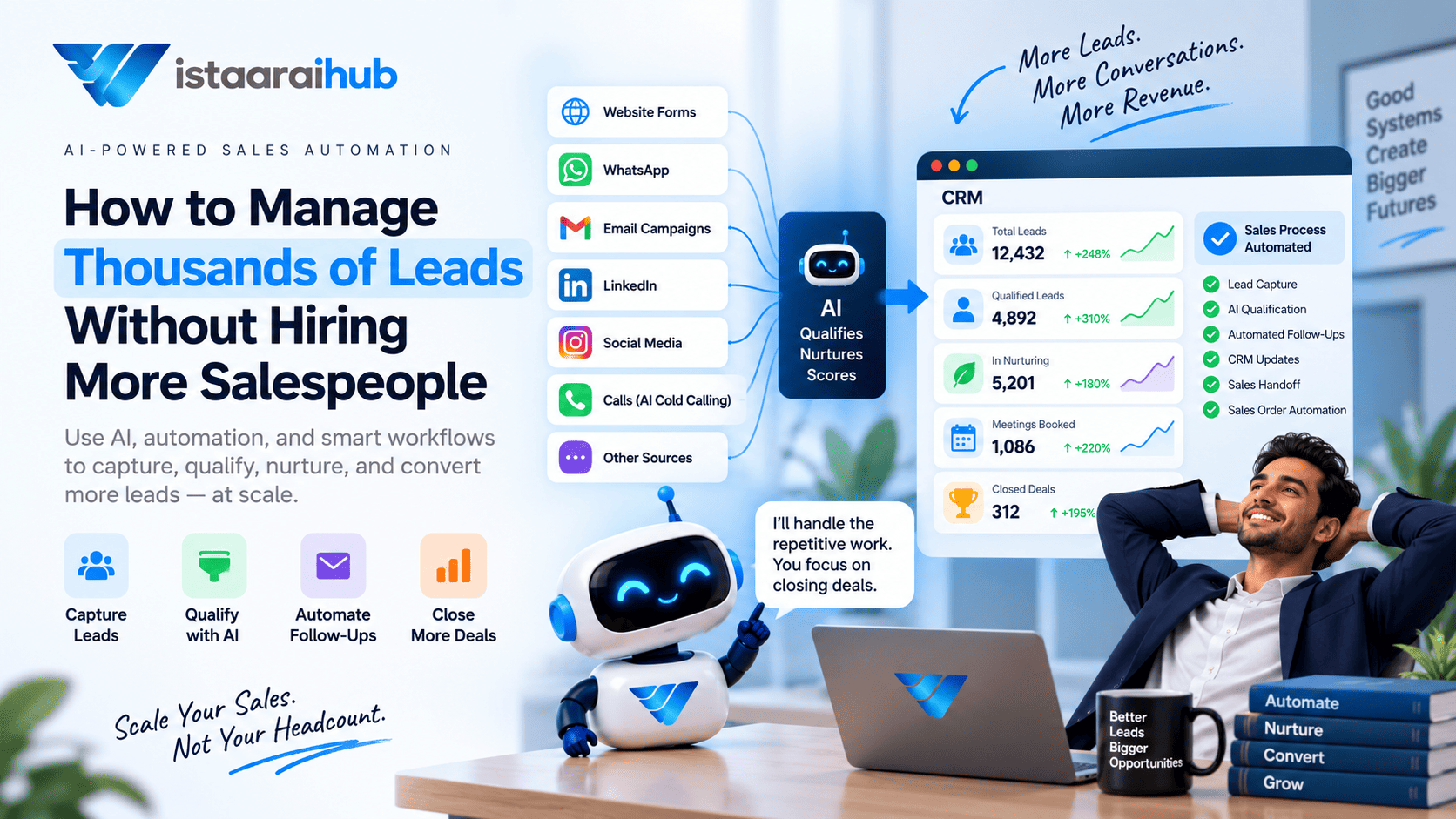
How to Manage Thousands of Leads Without Hiring More Salespeople
Getting more leads sounds like good news.
Until your sales team has to manage them.
A business might generate hundreds or even thousands of leads from its website, advertising campaigns, WhatsApp, social media, landing pages, referrals and other channels. But adding more leads doesn't automatically mean adding more revenue.
The real challenge is lead management at scale.
Salespeople still have to decide which leads need an immediate response, which ones need qualification, which prospects need follow-up, and which leads are simply not ready to buy yet.
When all of this is handled manually, the sales team eventually reaches a limit.
That is where sales automation becomes useful.
Instead of hiring another salesperson for every increase in lead volume, businesses can automate repetitive parts of the sales process while keeping salespeople involved in conversations that actually require a human.
Why Managing Thousands of Leads Becomes Difficult
Imagine a company receives 2,000 new leads in a month.
At first, the sales team may try to contact everyone manually.
But several problems quickly appear:
- New leads don't always receive an immediate response.
- Salespeople spend time contacting leads that aren't qualified.
- Follow-ups get missed.
- Prospects receive repetitive messages.
- Old leads disappear inside the CRM.
- Sales representatives don't remember previous conversations.
- Managers have limited visibility into the pipeline.
- Leads that need nurturing are treated the same as ready-to-buy prospects.
The problem isn't necessarily the number of leads.
It's the amount of manual work required to process every lead.
A scalable sales operation needs a system that can handle repetitive work automatically.
What Is Sales Automation?
Sales automation uses software, CRM workflows, integrations and AI to automate repetitive activities across the sales process.
Instead of asking a salesperson to manually perform every step, the system can handle tasks such as:
- Lead capture
- Lead assignment
- Lead qualification
- Lead scoring
- Email follow-ups
- WhatsApp communication
- Appointment reminders
- CRM updates
- Lead nurturing
- Sales notifications
- Re-engagement campaigns
A simple sales automation workflow can look like this:
Lead Captured → Instant Response → Qualification → Lead Score → Nurturing → Sales Handoff
The salesperson doesn't disappear from the process.
Their role changes.
Instead of spending most of the day processing leads, they can spend more time speaking with qualified prospects.
1. Capture Every Lead in One Place
The first step in managing thousands of leads is knowing where they are coming from.
Leads might arrive through:
- Website forms
- Landing pages
- Google Ads
- Meta Ads
- Social media
- Chatbots
- Phone calls
- Email campaigns
- Referral programs
If every source sends leads into a different spreadsheet or inbox, managing them becomes difficult.
A centralized CRM gives the sales team a single place to track prospects.
For example:
| Lead information | Example |
|---|---|
| Name | Rahul Sharma |
| Source | Website |
| Requirement | 3BHK apartment |
| Budget | ₹1.2 crore |
| Timeline | 3 months |
| Lead score | 78 |
| Status | Qualified |
| Next follow-up | October 15 |
| Sales owner | Assigned salesperson |
The important part is that this information should be captured automatically whenever possible.
2. Respond to New Leads Automatically
One of the simplest sales automation opportunities is the first response.
When someone submits a form at 2:00 AM, the sales team may not be available.
An automated workflow can acknowledge the enquiry immediately.
For example:
"Thanks for your enquiry. We'd like to understand what you're looking for. What type of property are you interested in?"
The same principle works for SaaS, education, financial services, agencies, healthcare, real estate and other industries.
The purpose isn't to bombard the prospect with messages.
It's to make sure the lead enters the sales process instead of sitting untouched in a CRM.
3. Automate Lead Qualification
When thousands of leads enter the pipeline, salespeople shouldn't have to manually ask the same basic questions to every prospect.
A sales lead automation workflow can collect information such as:
- What product or service are you interested in?
- What is your budget?
- When do you plan to purchase?
- Which location are you interested in?
- What problem are you trying to solve?
- Are you comparing other options?
The answers can then be used to determine what happens next.
For example:
High intent → Salesperson
Medium intent → Nurturing
Low intent → Automated follow-up
This allows the sales team to spend less time on initial qualification.
4. Use Lead Scoring to Prioritize the Pipeline
When you have 50 leads, a salesperson might review them individually.
When you have 5,000 leads, that approach doesn't scale.
This is where lead scoring becomes useful.
A scoring system can consider signals such as:
- Buying timeline
- Budget
- Product interest
- Website activity
- Responses to messages
- Demo requests
- Appointment requests
- Previous interactions
For example:
| Lead | Intent | Timeline | Score | Action |
|---|---|---|---|---|
| A | High | This month | 91 | Sales call |
| B | Medium | 3 months | 62 | Nurture |
| C | Low | Unknown | 28 | Automated follow-up |
The exact scoring model should depend on the business.
The important idea is simple:
Salespeople should know which leads deserve attention first.
5. Don't Mark "Not Now" Leads as Lost
This is one of the most overlooked parts of lead management.
Suppose a prospect says:
"We're interested, but contact me in three months."
Is that a lost lead?
Not necessarily.
The prospect may genuinely want the product but have a delayed buying timeline.
Instead of keeping every such lead in the active pipeline forever, businesses can create a nurture or future opportunity stage.
Store information such as:
- Buying timeline
- Reason for delay
- Product interest
- Budget
- Previous conversation
- Last interaction
- Next follow-up date
- Assigned salesperson
Then automate the next action.
For example:
Interested → Not ready → Nurture → Follow up in 3 months → Requalify
This prevents future opportunities from being forgotten.
6. Automate Lead Nurturing
Not every prospect is ready to buy today.
Some need:
- More information
- A pricing discussion
- Internal approval
- Budget approval
- A product comparison
- A few weeks to make a decision
This is where lead nurturing fits into the sales process.
Instead of repeatedly asking:
"Are you ready to buy?"
the business can provide useful information over time.
For example:
Day 1: Product information
Day 7: Relevant use case
Day 21: Customer story
Day 45: Product update
Day 90: Follow-up from sales
The exact timing should depend on the product and buying cycle.
Good nurturing is not simply sending more emails.
It is maintaining relevant communication until the prospect is ready to have a sales conversation.
7. Let AI Handle Conversations at Scale
Traditional automation works well when the workflow is predictable.
AI can be useful when conversations aren't.
For example, a prospect might say:
"I'm interested, but I need to discuss it with my partner first."
Another might say:
"The product looks good, but the price is higher than our current solution."
Another might ask:
"Can you show me how this works for a real estate business?"
These aren't simple yes/no responses.
An AI sales agent can interpret the conversation, collect relevant information and determine the next step based on the workflow you've designed.
This can support:
- Lead qualification
- FAQ handling
- Lead nurturing
- Follow-up conversations
- Appointment scheduling
- Re-engagement
The key is to give the AI clear rules about what it can and cannot do.
8. Use AI Cold Calling Carefully
For businesses that depend heavily on phone conversations, AI cold calling can become another part of sales automation.
An AI calling system can be used for activities such as:
- Initial qualification
- Follow-up calls
- Appointment confirmation
- Lead reactivation
- Basic information collection
For example, instead of a salesperson manually calling hundreds of unqualified leads, an automated calling workflow can identify which prospects are interested and route qualified conversations to the appropriate sales representative.
However, automated calling needs to follow applicable telecom, consent, disclosure and privacy requirements in the markets where it is used.
The objective should be to reduce repetitive work—not to create unwanted calls.
9. Automate the Sales Process, Not Just Follow-Ups
This is where sales process automation becomes more powerful.
Many businesses automate one task, such as sending an email, while the rest of the process remains manual.
A better approach is to look at the complete workflow.
For example:
Lead Generation
↓
Lead Capture
↓
Instant Response
↓
Qualification
↓
Lead Scoring
↓
Nurturing
↓
Appointment Booking
↓
Sales Handoff
↓
Proposal
↓
Order
↓
CRM Update
Each stage can contain automation where appropriate.
This creates a connected sales process instead of a collection of disconnected tools.
10. Keep the CRM Updated Automatically
A CRM is only useful when its information is accurate.
But asking salespeople to manually update every interaction creates another administrative burden.
A sales automation system can automatically record:
- Messages
- Calls
- Qualification answers
- Lead scores
- Follow-up dates
- Appointment status
- Sales ownership
- Conversation history
For example, after a conversation the CRM might contain:
| Information | Example |
|---|---|
| Lead status | Nurturing |
| Buying timeline | 3 months |
| Reason for delay | Budget approval |
| Product interest | Enterprise plan |
| Lead score | 62 |
| Last conversation | Sep 18 |
| Next follow-up | Dec 18 |
| Sales owner | Assigned salesperson |
| Conversation history | Stored |
Now the salesperson doesn't need to start from zero when the lead becomes active again.
11. Automate Sales Handoffs
Automation should not mean that every lead stays with AI forever.
At some point, a human should take over.
For example:
Lead score ≥ 80
→ Assign sales representative
→ Notify salesperson
→ Provide conversation summary
→ Show lead requirements
→ Show previous objections
→ Show recommended next action
This gives the salesperson context before they make contact.
Instead of:
"Hi, we spoke a few months ago. Do you remember us?"
the salesperson can begin with relevant information from the previous interaction.
That's a much more useful handoff.
12. Sales Force Automation Helps Teams Scale
Sales force automation focuses on reducing repetitive administrative work for sales teams.
Depending on the business, this can include:
- Lead assignment
- Task creation
- Follow-up reminders
- Contact management
- Pipeline updates
- Activity tracking
- Notifications
- Sales reporting
The benefit isn't simply that fewer tasks are performed manually.
It is that sales representatives have more time for activities that require judgment, relationship building and negotiation.
What About Sales Order Automation?
Lead management doesn't stop when a prospect becomes qualified.
For businesses with a structured purchasing process, automation can continue into the order stage.
Sales order automation can help connect activities such as:
Qualified Lead → Proposal → Approval → Order → CRM Update
Depending on the business, this may involve integrations with CRM, billing, inventory or other business systems.
This creates a more connected process from the first enquiry to the eventual purchase.
A Practical Architecture for Managing Thousands of Leads
A scalable system doesn't have to be complicated.
A basic architecture can look like this:
Layer 1: Lead Sources
↓
Layer 2: CRM
↓
Layer 3: Automation
↓
Layer 4: AI
↓
Layer 5: Human Sales Team
The goal is not to remove people from the system.
It is to make sure people spend their time where human involvement has the most value.
How Many Leads Can One Salesperson Handle?
There isn't one universal number.
It depends on:
- Average deal size
- Sales cycle
- Lead quality
- Industry
- Number of interactions required
- Inbound vs outbound leads
- Qualification process
- CRM quality
- Level of automation
A salesperson handling 50 high-value enterprise opportunities is doing a very different job from someone handling hundreds of short-cycle enquiries.
That's why businesses should avoid using a simple "leads per salesperson" number as their only capacity metric.
A better question is:
How much manual work does each lead require before a salesperson actually needs to get involved?
That is where automation can make a measurable difference.
When Should You Automate Your Sales Process?
Automation becomes particularly useful when you notice patterns such as:
- Salespeople spend hours on repetitive follow-ups.
- New leads are not contacted quickly.
- Leads are sitting untouched in the CRM.
- Sales representatives manually qualify every enquiry.
- Managers cannot easily see pipeline status.
- Old leads are forgotten.
- Salespeople spend more time updating CRM records than selling.
- Marketing generates more leads than sales can process.
You don't have to automate everything at once.
Start with the biggest bottleneck.
A Simple Sales Automation Workflow
Here's a practical example for a company receiving thousands of leads:
1. Lead arrives
↓
2. CRM automatically creates the lead
↓
3. Instant WhatsApp/email response
↓
4. AI asks qualification questions
↓
5. Lead receives a score
↓
6. High-intent lead → Salesperson
↓
7. Medium-intent lead → Nurturing
↓
8. Low-intent lead → Automated re-engagement
↓
9. Future opportunity → Scheduled follow-up
↓
10. Conversation and activity automatically saved in CRM
This approach allows a relatively small sales team to work with a much larger lead volume because the team isn't manually performing every step.
The Real Goal Isn't "More Automation"
It's easy to think that scaling sales means adding more automation.
That's not necessarily the goal.
The goal is to create a system where:
Every lead gets a response.
Every qualified lead gets attention.
Every future opportunity has a next step.
Every conversation has context.
Every salesperson knows which leads require their attention.
And importantly:
No good lead gets forgotten simply because the sales team was busy.
How VistaarAIHub Can Help
VistaarAIHub is designed around this type of sales workflow.
Instead of treating lead generation, qualification, follow-up and CRM management as separate activities, an AI-powered sales workflow can connect them.
For example:
Lead Captured
→ CRM
→ Instant WhatsApp / Email
→ AI Qualification
→ Lead Scoring
→ Automated Nurturing
→ Appointment
→ Sales Handoff
The sales team can then focus on leads that are ready for a conversation instead of manually chasing every enquiry.
The exact workflow can be adapted based on the company's sales process, lead volume and buying cycle.
Final Thoughts
Managing thousands of leads doesn't necessarily mean hiring another salesperson every time lead volume increases.
The bigger opportunity is to examine how much of the sales process is still being performed manually.
Sales automation can handle repetitive tasks.
Sales lead automation can help qualify and prioritize prospects.
Sales process automation can connect different stages of the funnel.
Sales force automation can reduce administrative work for sales representatives.
And AI can add another layer by handling conversations, qualification, nurturing and, where appropriate, AI cold calling.
The salesperson still matters.
The difference is that they no longer have to spend their entire day finding out which leads are worth their time.
The scalable sales team isn't necessarily the one with the most salespeople. It's the one with the clearest process for deciding where each salesperson's time should go.
Frequently Asked Questions
How can I manage thousands of leads?
Use a centralized CRM combined with lead scoring, automated qualification, follow-ups, nurturing and clear sales handoff rules. The goal is to prioritize leads rather than manually treat every lead the same way.
What is sales automation?
Sales automation uses software, CRM workflows and AI to automate repetitive sales activities such as lead capture, qualification, follow-ups, task creation, nurturing and CRM updates.
Can AI manage sales leads?
AI can assist with lead qualification, customer conversations, follow-ups, nurturing, appointment scheduling and lead prioritization. Human salespeople should remain involved where judgment, negotiation or relationship management is required.
How does sales automation help a small sales team?
It can reduce repetitive administrative work and help salespeople prioritize qualified opportunities instead of manually processing every lead.
What is sales force automation?
Sales force automation refers to software-supported automation of repetitive sales activities such as lead assignment, follow-up tasks, pipeline updates, activity tracking and CRM management.
What is AI cold calling?
AI cold calling uses AI-powered voice systems to conduct or assist with outbound sales conversations. Its use should comply with applicable consent, disclosure, privacy and telecommunications requirements.
Can sales automation replace salespeople?
Sales automation is generally used to reduce repetitive work and support sales teams. Activities such as negotiation, complex problem solving and relationship building can still require human involvement.